
LinkedIn Easy Apply bot for Mac
JobBot: Auto Apply is a Mac app that sends LinkedIn Easy Apply applications for you. It works in a browser window on your Mac, signed in to your own LinkedIn account, and it shows you every decision it makes.
What it does on LinkedIn
- Searches LinkedIn for the job titles you choose, and only those.
- Applies to Easy Apply jobs. Jobs that send you to another site to apply are skipped.
- Skips roles outside the titles you saved and jobs you have already applied to.
- Fills in the Easy Apply form, including questions with several boxes.
- Applies once per job, even when LinkedIn lists the same job more than once.
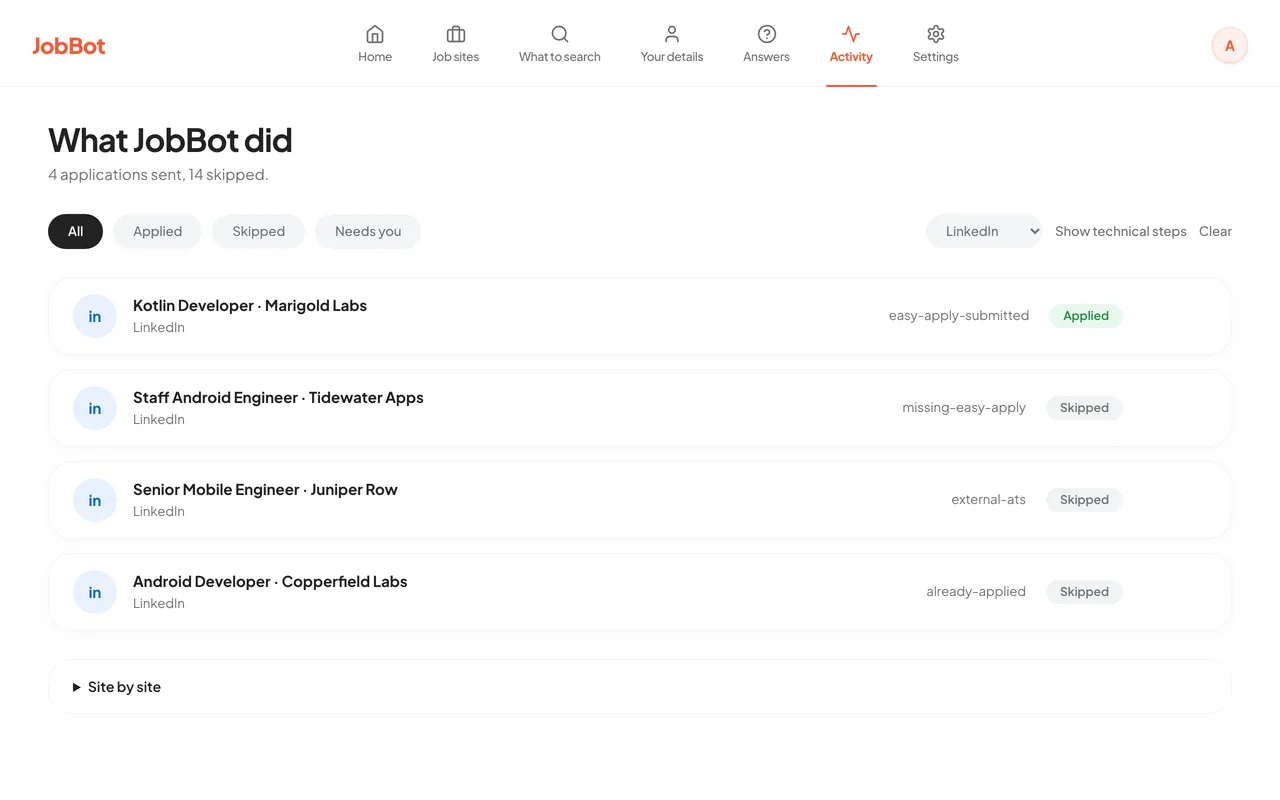
- Writes every apply and every skip, with the reason, to the Activity screen.
Set it up
- Download JobBot, unzip it and drag it to Applications. You need a Mac with Apple silicon on macOS 13 or later.
- Open JobBot and sign in. You start on the free plan, with no card.
- Open Your details and fill in your name, email and phone. A real run does not start without them. Then add what LinkedIn asks for: pay and notice period, skills and years, location and links. A detail you leave empty gives no answer, so a job that asks for it is skipped.
- In Your details, list the cities you want to look in. Add Remote if you want remote jobs. Leave the list empty to look anywhere.
- Open Job sites and choose Sign in next to LinkedIn. A browser window opens. Sign in to LinkedIn there yourself. JobBot never asks for your LinkedIn password.
- Open What to search. Add the job titles you want, a lowest salary, how recent a listing must be, and the most applications per role. Choose your resume file.
- On Home, choose "Preview without applying". Read the Activity screen to see what it would have done and why. Previews are not limited.
- When the preview looks right, start a real run. Stay near your Mac for the first few.
How it handles screening questions
LinkedIn Easy Apply forms ask questions before they take an application: notice period, pay, years with a skill, and more. JobBot answers each one in this order.
- Your saved answer. If you saved an answer to that question on the Answers screen, JobBot uses it. This always comes first.
- Your details. If the question is about something you filled in on Your details, such as notice period, pay, years with a skill, location or a common yes or no, JobBot answers from it. Nothing is built in. If that detail is empty, JobBot does not guess and does not ask the AI. The question waits for you on the Answers screen and the job is skipped.
- AI, if you switched it on. AI answers from your resume and your details, and is told to say it does not know when they do not cover the question. An AI answer is listed under "Answered by AI, please check" so you can keep or correct it. With Ollama the question stays on your Mac. With OpenRouter it is sent to OpenRouter with your resume text and details; the privacy policy says exactly what.
- Otherwise it skips the job. With no answer it trusts, JobBot drops that job and lists the question on the Answers screen for you. The next run uses what you save.
Some questions are always left for you, such as consent and opinion questions. Jobs that ask for a PAN number are skipped.
LinkedIn's Easy Apply limits
LinkedIn says it has daily and speed limits on Easy Apply. It says they are there to curb automation and bots, and it does not publish the number. People who hit the daily limit commonly report about 50 applications in 24 hours. Checked on 8 October 2026.
JobBot does not try to get around these limits. Keep your cap per role low so a run stays well under them. When LinkedIn stops taking applications for the day, wait for the next day.
Limits and risks
- It is an alpha. Screens and behaviour change between builds, and some applications will not finish.
- Software roles have had the most use. JobBot searches for the job titles you save, for any kind of role. Matching has had the most use on software roles so far.
- The free plan sends 5 applications a day. That is across all job sites, counted on your Mac and reset at midnight, your local time. Preview runs are not limited. Pro has no daily limit from us, and your own caps still apply.
- Empty details mean skipped jobs. A job that asks for something you have not filled in is skipped, and the question waits for you.
- Security checks stop it. JobBot does not try to solve a CAPTCHA. It skips that job or rests the job site.
- LinkedIn limits Easy Apply. See the section on LinkedIn's limits above.
- Your account is at risk. Most job boards discourage or prohibit automated applying, and an account can be restricted for unusual activity. The risk is real and it is yours to weigh. Start with small caps.
- Your Mac must stay on. JobBot runs on your Mac, so it stops when the Mac sleeps.
Nothing here promises interviews or offers. JobBot saves you the typing. The rest of the job hunt is still yours.
Common questions
Is this LinkedIn Easy Apply bot free?
There is a free plan and a paid one. The free plan lets you submit 5 applications a day across all job sites, LinkedIn included. Preview runs are not limited. When you use up the day's 5, JobBot offers a 15-day Pro trial with no card, once per account and once per Mac. Pro has no daily limit from us.
Whose details does JobBot use to answer LinkedIn's questions?
Only yours. You fill them in on the Your details screen, and nothing is built in. If a detail is empty, JobBot gives no answer and skips the job that asks for it.
Is it a Chrome extension for LinkedIn?
No. It is a Mac app, and there is no browser extension to install. It opens Chrome, Edge, Brave or Chromium, whichever is already on your Mac, in its own window.
Will LinkedIn block my account?
They can. Most job boards discourage or prohibit automated applying, and an account can be restricted for unusual activity. JobBot is paced like a person, and you can cap how many applications each job title sends, but nobody can promise your account is safe. The risk is yours to weigh. Start with small caps.
Does it work on Windows?
No. JobBot runs on Macs with Apple silicon, on macOS 13 or later. There is no Windows or Linux build, and no build for Intel Macs.